


Foresite Catalyst
MXDR for Google Cloud
From AI-driven SecOps to cloud security automation, Foresite delivers fully managed and scalable security solutions tailored for enterprise, hybrid, and multi-cloud environments.
From our Adaptive Security Model to our Google Cloud Premier SecOps Partnership, we combine deep expertise, purpose-built technology, and customer-first flexibility.
Combine Google’s native security power with Foresite’s expert-driven, AI-powered operations to secure your cloud and unlock business growth.

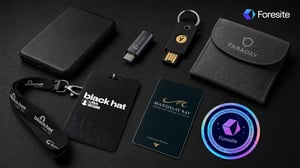
The short version: Black Hat's network is genuinely hostile, but most of the folklore ("your phone gets popped in the elevator") is overblown. The attacks that actually catch people are mundane: joining a rogue Wi-Fi network, plugging in a found USB, leaving a laptop unattended, getting phished weeks later with a credential harvested on-site, or getting tricked into pasting a "fix this error" command that installs malware yourself. Patch your devices, keep your radios off, bring as little as possible, use hardware MFA, and never run a command a web page tells you to. Do that and you're fine.
Every year around this time, someone tells me a version of the same story. "Don't bring anything to Black Hat. Phones, watches, laptops, they all get popped in the elevator. People take over the hotel Wi-Fi and stand up fake cell towers in the coffee shop."
I get why the story sticks. It's a great story. It's also mostly folklore, and the folklore does you a disservice, because it scares people out of a fantastic week of learning while leaving the risks that actually matter unaddressed.
This year the noise will be louder than usual, because every stage and every booth will be talking about AI threats. Some of that matters. But the thing most likely to ruin your week isn't a frontier AI attack. It's a fake CAPTCHA and your own copy-paste.
I've spent a lot of the last decade watching real attacks unfold in a SOC. So here's what I'd tell someone on my own team heading to Las Vegas for the first time.
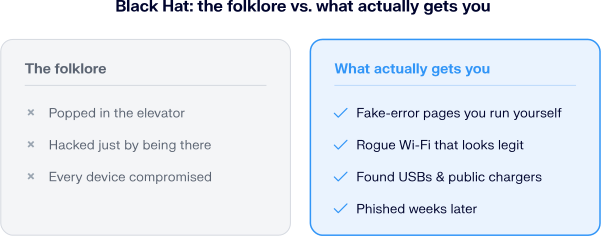
What people warn you about at Black Hat versus what actually gets them. The real risks are more mundane, and far more preventable, than the stories suggest.
No. A fully-patched, up-to-date phone sitting in your pocket with its radios idle is a hard target. Nobody is burning a rare, working exploit on a random attendee's locked phone in a hotel lobby, in public, for nothing. That's not how any of this works.
The Bluetooth and AirDrop spam you'll hear about is mostly nuisance-grade: a Flipper Zero or a phone app flooding you with junk pairing requests and pop-ups. Decline and move on. The one real exception is medical hardware. The same BLE spam has crashed insulin pumps, Bluetooth hearing aids, and payment readers, so if you rely on a BLE device, treat this as a genuine risk and keep it shielded.
Treat every network there as hostile, and you'll be fine. The conference network is often called one of the most hostile in the world, and the raw traffic on it would look malicious anywhere else. It's also watched around the clock by a volunteer NOC of senior engineers, and most of that "malicious" traffic is training labs, not people hunting you.
The real risk isn't the official network. It's impostor Wi-Fi: rogue access points with legit-looking names like "hotel_guest" or "BlackHat_WiFi" that are trivial to stand up. Fake cellular base stations that try to capture SMS have been demonstrated here for years. The vulnerability is the act of connecting, so the fix is to not connect. Use your carrier's cellular data instead.
Bring as little as you can, ideally a clean device you're willing to wipe. This is a people conference. You need a loaded work laptop far less than you think. If you do bring one, strip it down first and treat it as disposable.
Five, in rough order of how often they land:
Never. This is the single fastest-growing attack of 2026, and it sidesteps everything else on this list. It's called ClickFi: a booby-trapped page shows a fake error, failed CAPTCHA, or "your transaction didn't go through" message, then instructs you to press Windows+R (or open Terminal), paste, and hit Enter. Hidden code has already loaded a malicious command onto your clipboard. Follow the steps and you install the malware yourself. No hostile Wi-Fi required.

A ClickFix attack in four steps. The page fakes an error, you paste the "fix," and the malware runs with your own hands on the keyboard.
It's rampant in crypto: fake wallet and transaction errors that route you to "report the problem" or a fake support agent, ending in a drained wallet or a stolen seed phrase. The rule is simple. A legitimate website will never ask you to run a command, open a terminal, or paste something to fix itself. If a page tells you to, close the tab.
Before you fly:
On the ground:
When you get home:
If you're a researcher, an exec, or anyone with a real adversary, add a second tier:
These are deliberate, threat-model-specific steps. Most attendees don't need them, and pretending everyone does is how the folklore got started.
Black Hat is one of the best weeks of the year to learn. Treating it like a radioactive zone gets in the way of that and isn't warranted. Treating it like your home coffee shop gets people burned. The right posture is the boring one: shrink your attack surface before you go, keep your radios off, and don't hand anyone an easy win.
That's the same principle we bring to running a SOC. Good security isn't about selling you fear. It's about knowing precisely which risks are real, so you can stop losing sleep over the ones that aren't.
See you on the floor.
Most attendees don't. A fully-patched primary phone with Wi-Fi and Bluetooth off is fine. If you want more separation without carrying a second device, a burner eSIM keeps your real number private. Reserve a full burner phone for genuine high-value targets or anyone who needs to stay off location-tracking networks entirely.
Use your own battery pack. Avoid public USB charging ports and unfamiliar cables. A charge-only data blocker adds a cheap layer if you must use an unknown port.
Assume it's hostile or impersonated. Prefer your carrier's cellular data. If you must use Wi-Fi, route everything through a trusted VPN, but tethering is the safer default.
A fake error or CAPTCHA page that tricks you into pasting and running a malicious command yourself, usually via Windows+R or a terminal. It's the top social-engineering technique of 2026 and is widely used to drain crypto wallets. Never run a command a website instructs you to.
Fully patch and update every device you bring, and enable full-disk encryption. That alone neutralizes most opportunistic attacks.
Yes. Delete them so your device can't auto-reconnect to a rogue access point impersonating a network you've joined before. Then keep Wi-Fi off entirely and use cellular data.
The security half is. Google Cloud Next runs at the same Mandalay Bay venue on the same Las Vegas networks, so the Wi-Fi, USB, and ClickFix advice all carries over. For the rest — badge pickup, sessions, food lines, and the desert heat — our team's Survive & Thrive at Google Cloud Next 2026 guide has 30+ tips.
—
Foresite isn't running a booth this year. We're co-sponsoring the Google Cloud Happy Hour, and I'll be there. RSVP here, grab a drink, and if you want to pressure-test your own setup with someone who actually runs a SOC, come find me. No pitch, just shop talk.